

Appearance
Loyalty Endpoints
Overview
anybill can act as a connector between POS systems and loyalty providers.
When a customer scans their loyalty card or QR code at the POS, transaction data - including loyalty information — can be transmitted through anybill to the corresponding loyalty provider.
How It Works
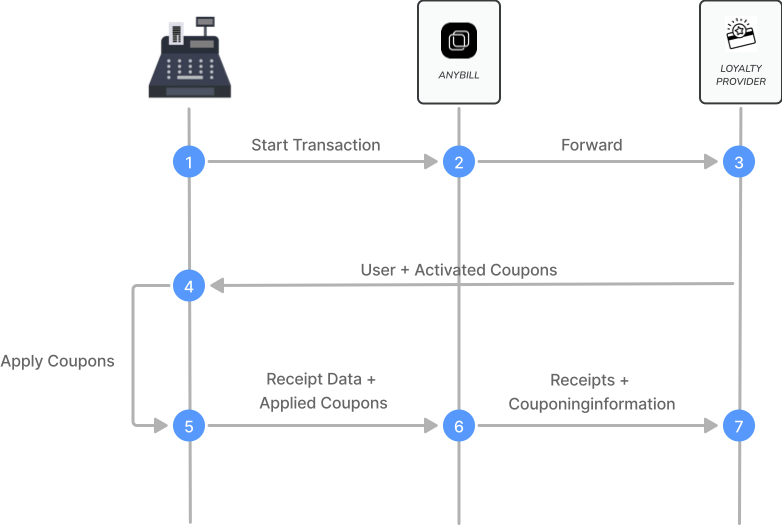
The loyalty integration extends the standard receipt submission with optional loyalty data.
When processing a transaction with loyalty participation:
- A transaction starts at the POS (e.g., QR code or customer card scanned).
- anybill transmits receipt and couponing information to the loyalty provider.
- The loyalty provider applies coupons and rewards.
- User and activated coupon data are returned.
- The final enriched receipt data is processed.
- A webhook is triggered and delivered to your system.
Starting a Loyalty Transaction
A loyalty transaction can be initiated via one of our loyalty endpoints.
When a user identifier (QR code, physical card, etc.) is scanned, you can use our loyalty endpoint to fetch activated coupons, collected points, or transaction IDs - depending on your loyalty partner.
Example Request:PUT /v3/loyalty/transactions
json
{
  "externalUserId": "1332423432"
}
externalUserId is the identifier of the loyalty member in the loyalty provider's system, i.e. the value that was scanned at the POS.
Example Response:
json
{
  "transactionId": "123",
  "customerId": "1332423432",
  "providerType": "HelloAgain",
  "points": 1250,
  "activatedRewards": [
    {
      "identifier": "23432432",
      "name": "Free coffee",
      "description": "One free coffee with your next purchase"
    }
  ],
  "providerData": {}
}
points is null if the provider does not use a points system. providerData carries provider-specific attributes that anybill passes through unchanged.
A started transaction can be cancelled with DELETE /v3/loyalty/transactions/{transactionId}; the response contains the transactionId and a status of CANCELED or TRANSACTION_NOT_ACTIVE_ANYMORE.
Deprecated provider-specific routes
The routes PUT /v3/loyalty/helloagain/transactions and DELETE /v3/loyalty/helloagain/transactions/{transactionId} are deprecated and hidden from the default API reference. Use the generic routes above for all new integrations.
Status codes
The Retry column is the behaviour a POS system has to implement for each code; the common rules (backoff, attempts, token refresh on 401) are described in the Retry Policy Guidelines. Neither endpoint returns 429.
| Status | Endpoints | When | Body | Retry |
|---|---|---|---|---|
| 200 | PUT /v3/loyalty/transactions, DELETE /v3/loyalty/transactions/{transactionId} | Transaction started / cancelled (for DELETE also when it was not active anymore, see status). | JSON, see above | – |
| 400 | PUT /v3/loyalty/transactions | Payload invalid, or the loyalty provider rejected the request. | plain text with the provider message | no – fix the payload; log the message |
| 401 | both | Token missing, expired or invalid. | empty or plain text | refresh the token, resend once |
| 403 | both | Missing scope or permission, or the loyalty module is not activated for this vendor. | plain text or empty | no – contact anybill |
| 404 | both | The loyalty user (externalUserId) or the transaction is unknown at the provider. | plain text | no – the cashier has to re-identify the customer |
| 500 / 502 | both | Unexpected server error or gateway problem. | empty | yes – exponential backoff |
| 503 | both | The loyalty provider system is temporarily unavailable. | plain text | yes – exponential backoff |
| 504 | both | Gateway timeout. | empty | yes – exponential backoff |
Starting a transaction is not idempotent: a PUT retried after a 5xx or a network error can start a second transaction at the provider if the first request had reached it. Cancel the transaction you do not use, and never book points on the receipt twice.
Integration with Bill Endpoint
Loyalty transactions are submitted using the standard POST /v3/bill endpoint, with the following key components:
User Identification
Use the userIdentification object to link the receipt to a loyalty member:
- externalId – external customer system ID
Loyalty Payment Details
Include loyalty information (such as points, redeemed coupons, etc.) using the couponingInformation field inside the extension:anybill object.
Example:
json
{
  "extension:anybill": {
    "couponingInformation": {
      "type": "Generic",
      "transactionId": "12345",
      "redeemedRewards": [
        {
          "identifier": "123456",
          "name": "Free coffee",
          "description": "One free coffee with your next purchase",
          "value": 2.5
        }
      ],
      "collectedPoints": 12,
      "usedPoints": 0,
      "providerData": {}
    }
  }
}typeis mandatory and must be spelled exactlyGeneric(case-sensitive).transactionIdis the id returned byPUT /v3/loyalty/transactions.redeemedRewards[]lists the rewards applied to this receipt;name,descriptionandvalueare optional.collectedPoints/usedPointsare optional andnullif the provider has no points system.providerDatais an optional object with provider-specific attributes.
Configuration
Loyalty integrations require configuration on the anybill side to connect with your specific loyalty provider.
Please contact anybill to:
- Set up your loyalty provider connection
- Configure the data format required by your loyalty system
- Enable loyalty webhooks for transaction notifications
💡 Tip:
The loyalty data structure is flexible and can be customized to match your loyalty provider’s requirements - including custom fields for transaction IDs, reward metadata, or program-specific attributes.
Required Fields
These fields are validated against the OpenAPI schema. Fields listed as required once the surrounding object is sent belong to an optional part of the payload — omitting that part entirely is fine, including it makes the listed fields mandatory.
Generated from the production OpenAPI specification (API version 3.0) on 3 September 2026.
PUT /v3/loyalty/transactions
Request body: LoyaltyTransactionInitiationDto
Always required
| Field | Type | Description |
|---|---|---|
externalUserId | string, non-empty | The loyalty user ID in the provider's system. |
DELETE /v3/loyalty/transactions/
| Name | Location | Type | Description |
|---|---|---|---|
transactionId | path parameter | string | The ID of the transaction to cancel |